

I wanted to be able to DM a bot on Slack and ask things like “what changed in the repo this week?” or “where is the rate limiter configured?” — and get an answer that actually understands my codebase. Here’s how I set that up with OpenClaw.
A personal AI coding assistant that:
OpenClaw is an open-source AI agent platform that connects to messaging platforms (Slack, Discord, Telegram, etc.). It routes your messages to an LLM and gives the LLM access to tools — file I/O, shell commands, web search. Essentially a local AI agent with a chat interface.
1 | Slack (DM / @mention) |
The gateway runs as a macOS launchd daemon. It starts on boot, auto-restarts on crash, and connects to Slack via WebSocket. No server, no cloud infrastructure.
Standard install. The onboarding wizard handles LLM provider setup and creates the config at ~/.openclaw/openclaw.json.
In the Slack API dashboard:
chat:write, app_mentions:read, im:history, im:read, im:write, users:readxoxb-...) and App Token (xapp-...)Then configure OpenClaw’s Slack channel:
1 | { |
The allowlist policy restricts access to your Slack user ID only — important since the bot runs on your machine with file system access.
I used Claude Sonnet 4.6 as the default — reasonable balance of speed and capability for daily coding tasks. Opus is available for in-session switching when needed, no restart required.
1 | { |
The fallback chain means if Sonnet hits rate limits, it degrades to Haiku automatically.
OpenClaw uses a workspace directory with markdown files that shape the agent’s behavior:
The agent doesn’t pre-index code. It uses tools at query time — exec to run git/grep/find, read to view files. Always working with the latest state, but it does mean the LLM needs to be competent at navigating codebases through tools.
OpenClaw sets up a macOS launchd daemon during installation — no manual configuration needed. It registers a plist at ~/Library/LaunchAgents/ai.openclaw.gateway.plist that starts the gateway on boot and auto-restarts on crash. Logs go to ~/.openclaw/logs/.
The gateway binds to localhost:18789 by default. You can verify it’s running with:
1 | launchctl list | grep openclaw |
Slack OAuth scopes — I forgot the users:read scope initially. Without it, the bot can’t resolve user IDs, which breaks the allowlist access control. It silently fails to verify who’s messaging it.
Memory is not code indexing — OpenClaw’s memory plugin stores the agent’s own notes and conversation context. It does not index source code. Codebase understanding is entirely tool-driven at query time. This keeps things fresh but means the LLM quality matters a lot for code navigation.
Socket Mode vs. Webhooks — Most Slack bot tutorials default to webhook mode, which requires a public URL. Socket Mode connects outbound over WebSocket — no inbound ports, no ngrok. Better fit for a local-only setup.
Personality files work well in practice — The SOUL.md / AGENTS.md pattern is more effective than I expected. Writing explicit behavioral rules (“confirm before editing”, “Sonnet for quick tasks, Opus for analysis”) leads to fairly consistent behavior across sessions.
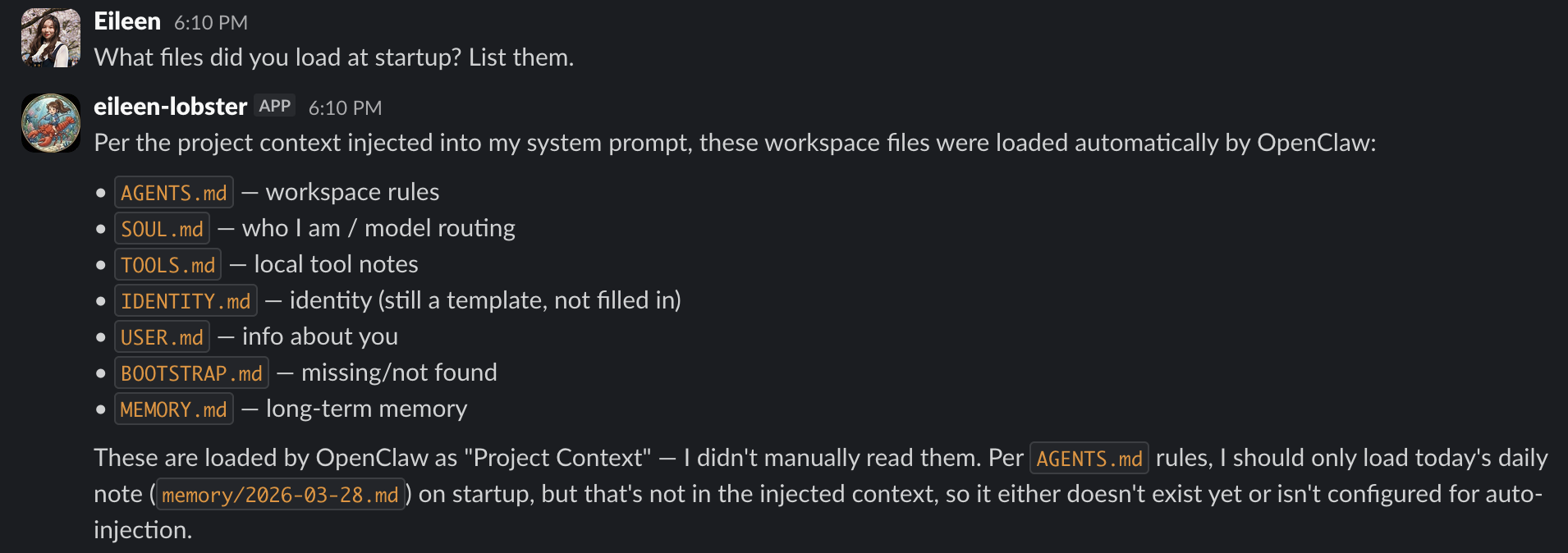
Here’s what it looks like in practice — asking the bot what files it loaded at startup:
What I typically ask:
It’s not a replacement for an IDE setup. It’s more like having a knowledgeable teammate on Slack who has read your codebase.
The whole setup took an afternoon. The result is a local AI assistant that can read your code, accessible from Slack.